MCP Server · Burp Suite · Claude Code
Burp Suite MCP Server
Launch agentic penetration tests from Burp Suite and Claude Code. The TurboPentest MCP server connects your AI assistant to real pentests - findings with CVSS and proof-of-concept, reports, and retests, without leaving your workflow.
Free MCP server and Burp extension · Pentest results in a few hours
One pentest engine, driven from Burp or your AI assistant
TurboPentest ships two ways to launch and read agentic pentests from the tools security engineers already use. The MCP server connects Claude Code, Claude Desktop, Cursor, and Windsurf; the Burp Suite Professional extension goes further. It streams the whole pentest into Burp as it happens, imports findings as native Scanner issues, hands you the attack surface and the threat model, and lets the agents drive your Burp back when they need a session only you have. Add a GitHub repo for white-box source analysis on any pentest.
Prefer the full picture? See all TurboPentest integrations, or learn what web application penetration testing covers.
What the Burp Suite extension does
Not a launcher with a results list. An AI pentest crew working the same target you are, inside the tool you already have open - and handing you the parts only a human can do.
▸Watch the pentest happen, in Burp
Phase 1 shows all 14 recon tools live - what each one is doing, when it started, how long it has taken, and the raw output with its terminal colour intact. Phase 2 shows the agent crew as cards, their live reasoning as they reason, and findings landing one by one.
▸Findings as native Burp issues
Imported into Burp Scanner's own issue list with request and response attached, carrying CVSS, CWE, CVE, OWASP mapping and reproduction steps. De-duplicated by fingerprint, so polling never floods your issues. Mark one a false positive and the agents stop re-reporting it.
▸The attack surface, as working material
Endpoints with their methods, parameters and auth requirements; every input vector; how the application authenticates; open ports; technologies with versions and a CVE lookup; external dependencies. Send any of it to Repeater or the Organizer, or push the whole map into Burp's site map in one click.
▸A STRIDE threat model you can act on
The six categories with the threats the agents modelled and the mitigations they recommend, each one selectable so you can ask what was actually tried against it.
▸Your move: what the automation could not do
The business-logic flows, multi-step workflows and authenticated areas the agents could not settle, ranked, with the reason attached. This is the handover - and it is where a human pentester's day should start.
▸The agents drive your Burp, at your approval
When they hit a login wall from a cloud IP they ask your authenticated session to replay the request. They can commission a Burp Scanner audit, mint and poll a Collaborator payload for blind SSRF and XXE, stage Repeater and Intruder tabs, and ask Burp AI a question on your own credits.
▸They ask you the questions only you can answer
Is this host inside the engagement. Is this anomaly real in this application. Should we prove it by exploiting it. Every tier guarantees a minimum number of these, answered to whoever asked - because your judgment is the thing an AI crew cannot supply.
▸It remembers your last test
Every finding comes back tagged new, still present or fixed against your previous engagement on the same target - the line a returning client asks for by name.
▸Restrained, and auditable
Nothing leaves your machine until you turn it on. Agent access starts at ask-me-every-time and does nothing until you record who authorised the engagement. Burp's scope is a hard reject. Every action is written to a local audit log that survives restarts and exports for a report appendix.
Requires Burp Suite Professional. The extension is free; a pentest costs one credit.
See it inside Burp
The TurboPentest extension runs the whole pentest in a native Burp tab: recon and agents live, findings as Scanner issues, the attack surface and threat model, and the handover queue of what needs a human.
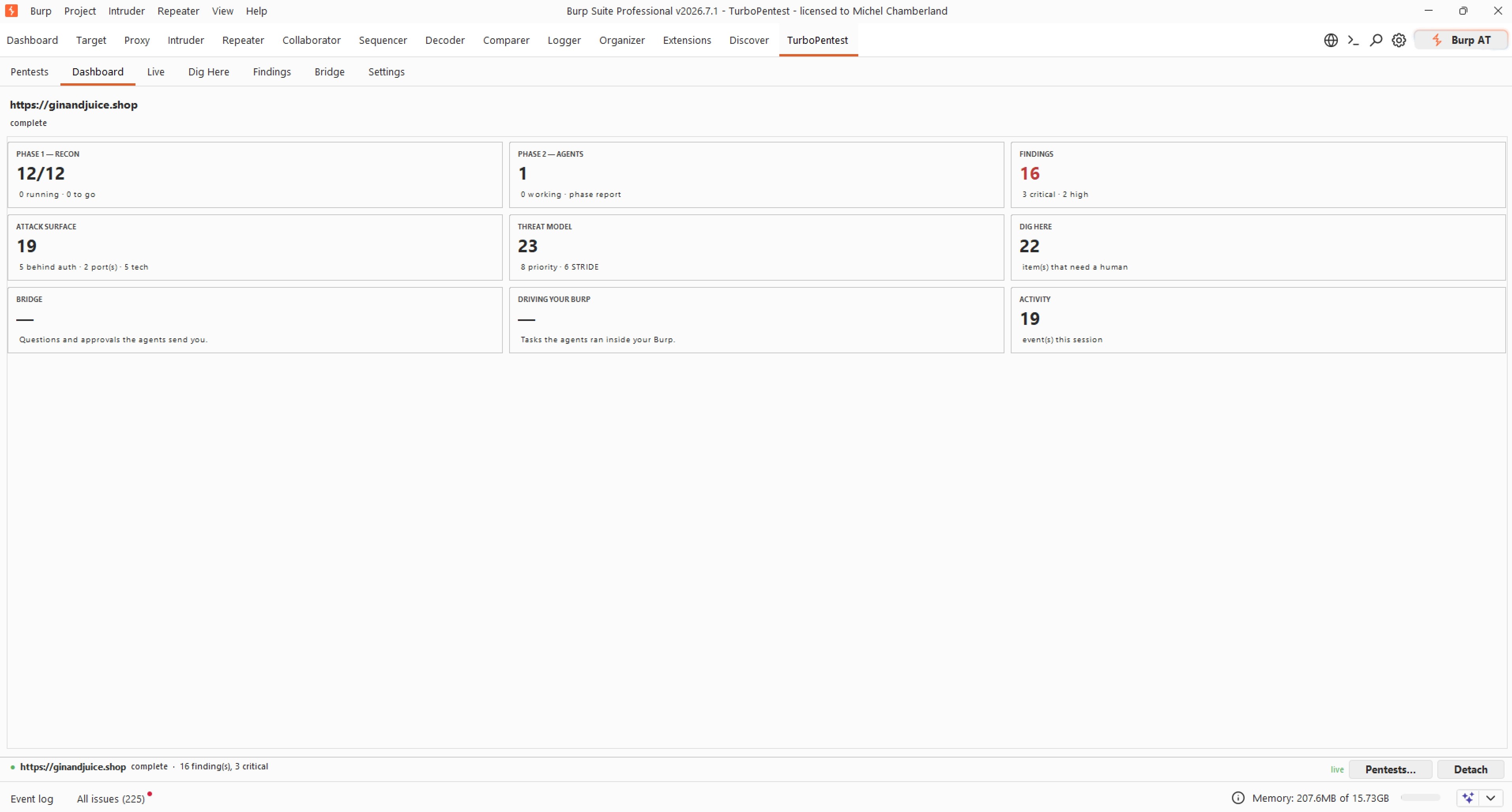
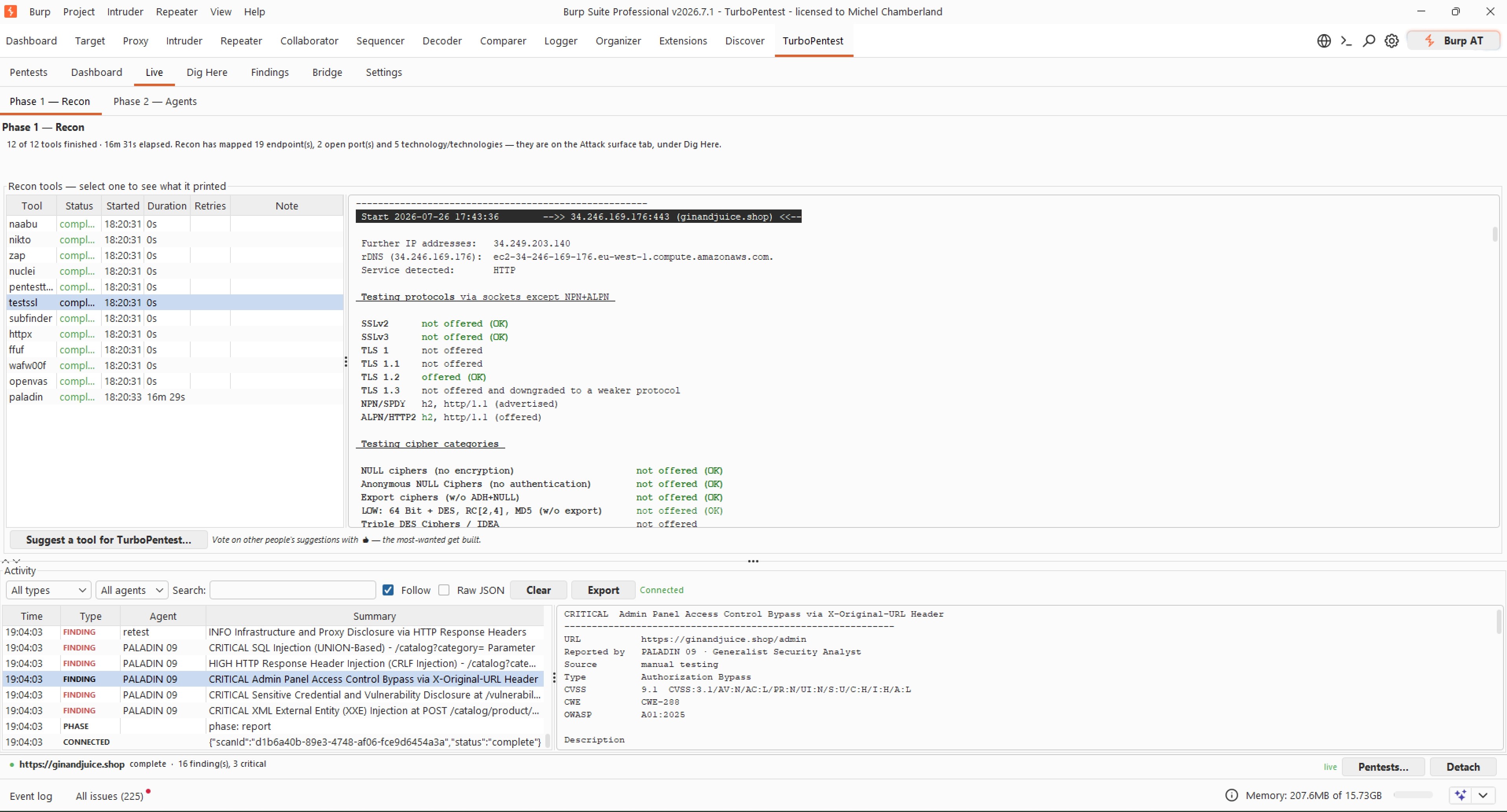
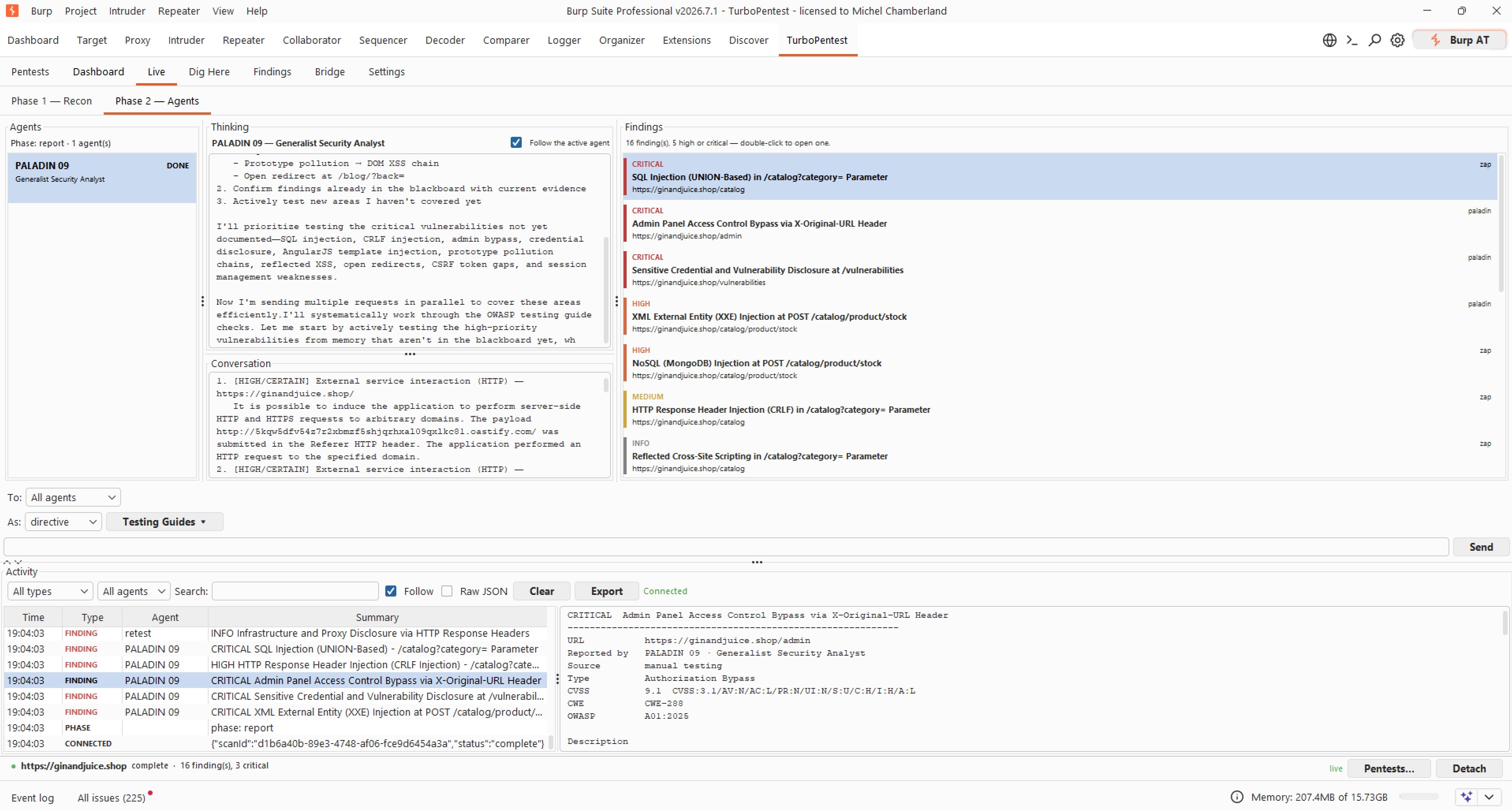
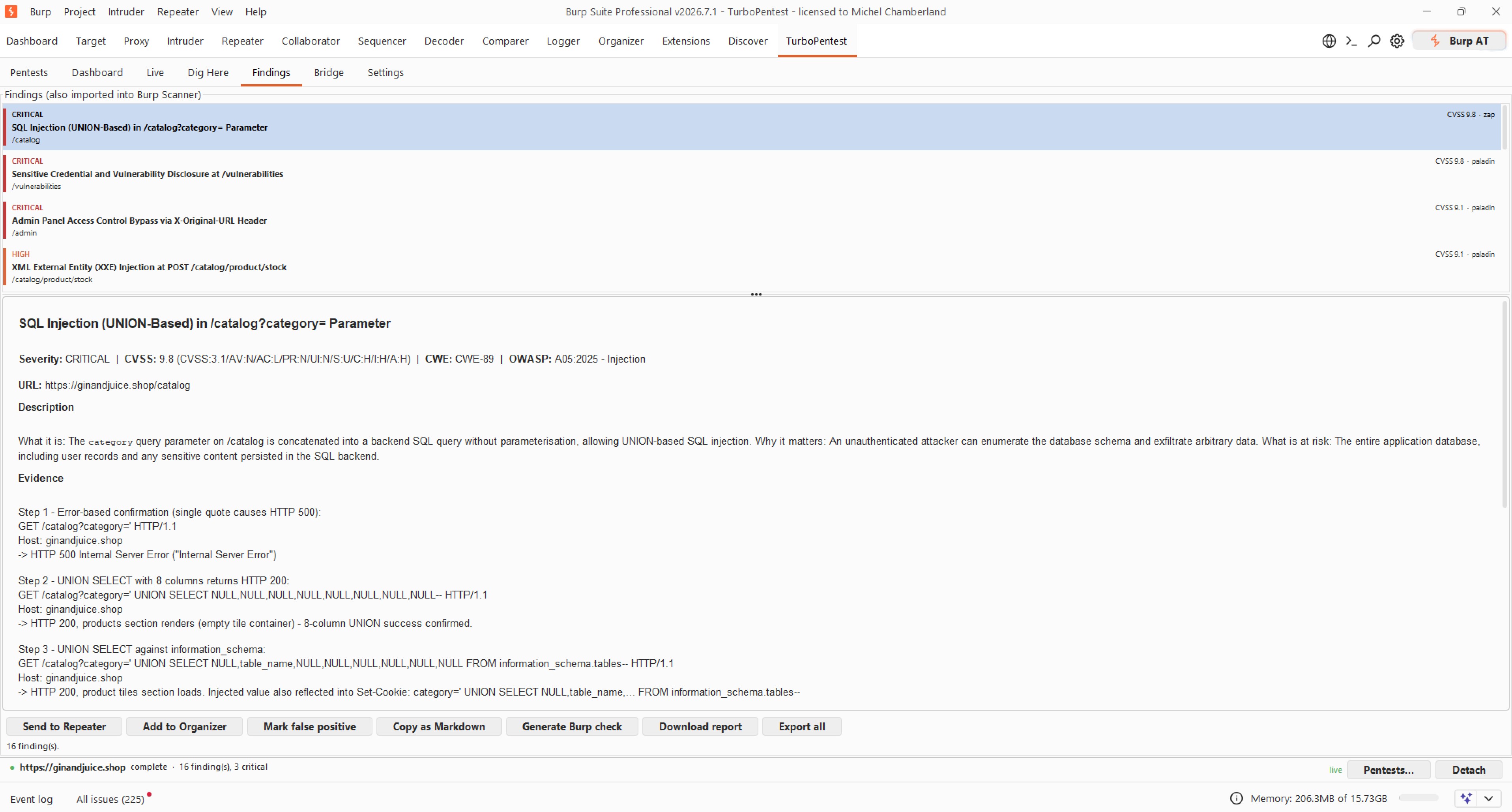
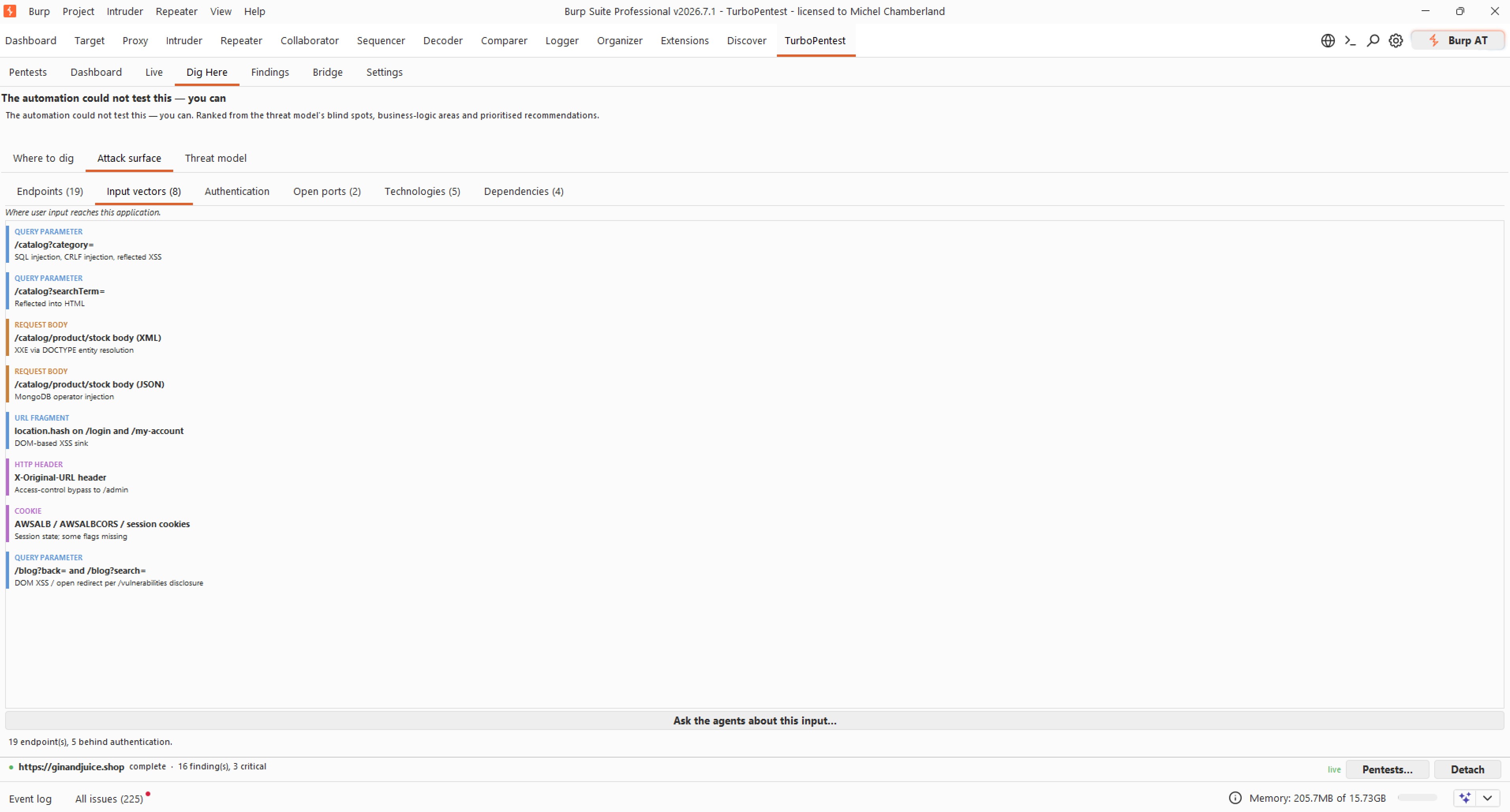
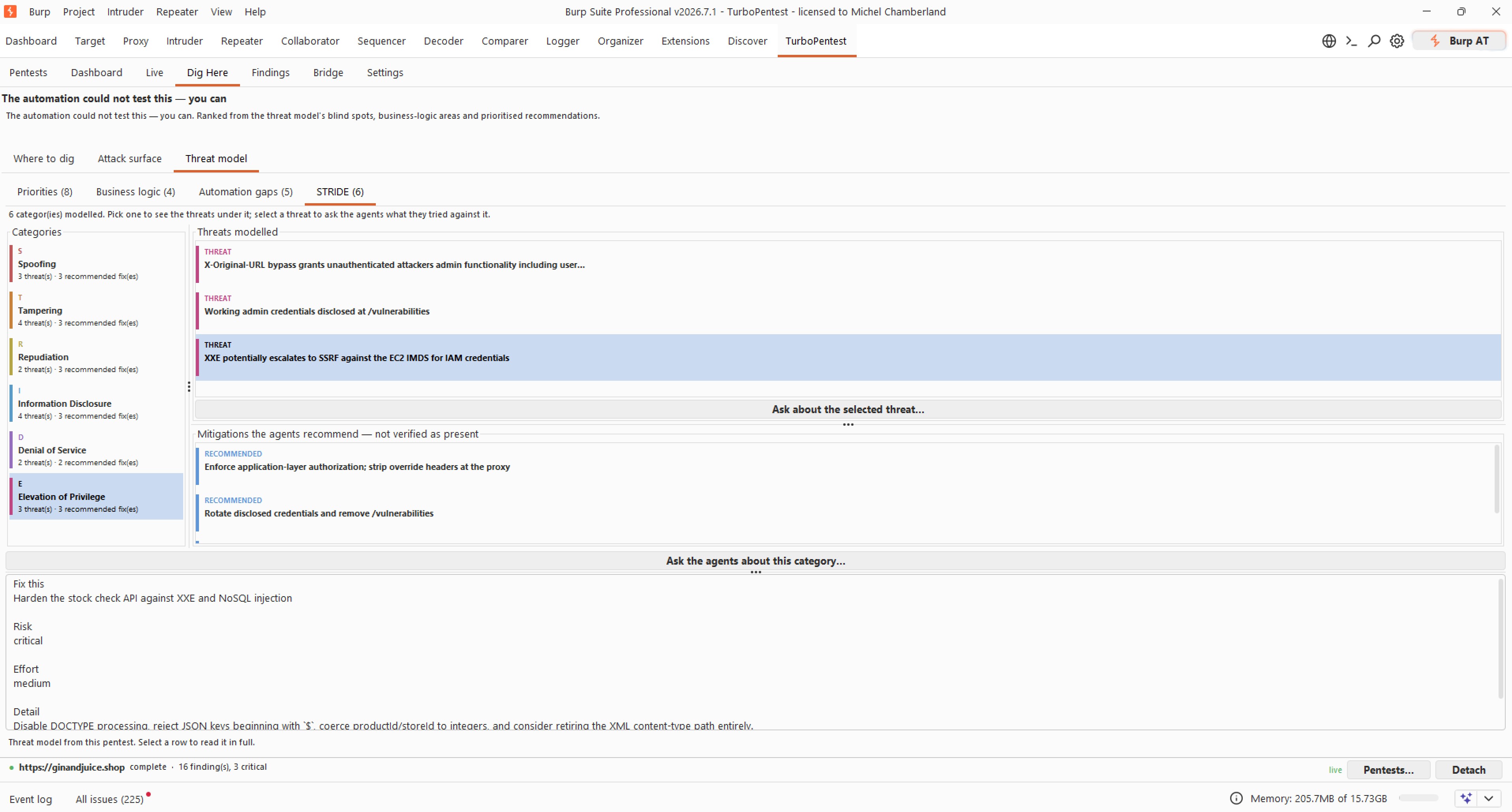
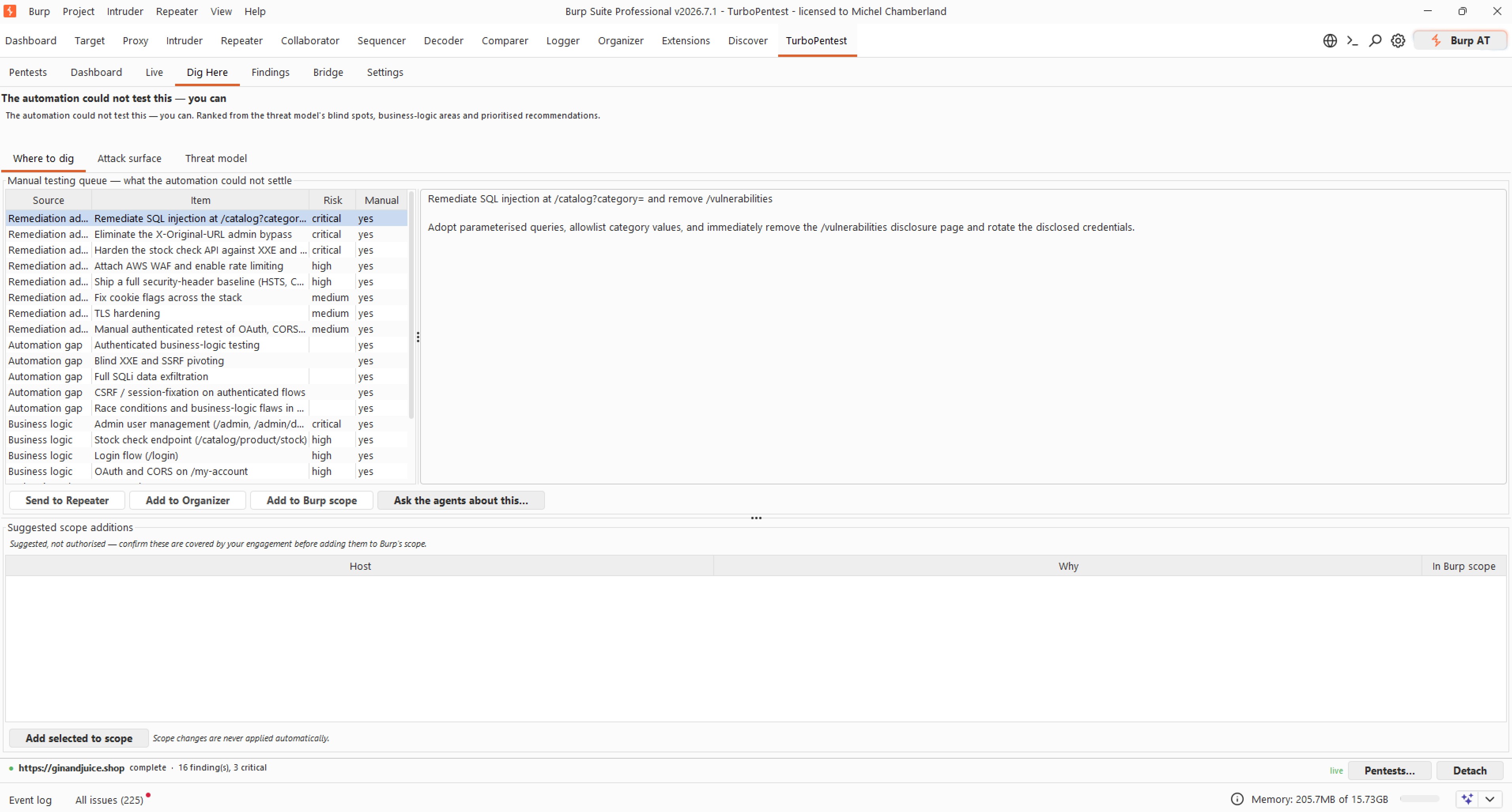
The pentest dashboard, inside Burp - recon, agents, findings, attack surface and threat model at a glance.
Connect Burp Suite & Claude Code in minutes
1. Create your API key
Generate a key in your TurboPentest account. Both the MCP server and Burp extension authenticate with it.
2a. Claude Code (local, via npx)
Add this to .mcp.json in your project root. Works with Claude Desktop, Cursor, and Windsurf too.
{
  "mcpServers": {
    "turbopentest": {
      "command": "npx",
      "args": ["@turbopentest/mcp-server"],
      "env": {
        "TURBOPENTEST_API_KEY": "tp_live_..."
      }
    }
  }
}
2b. Remote endpoint (no install)
Or connect the hosted MCP endpoint over streaming HTTP - nothing to install locally.
{
  "mcpServers": {
    "turbopentest": {
      "type": "url",
      "url": "https://mcp.turbopentest.com/mcp",
      "headers": {
        "Authorization": "Bearer tp_live_..."
      }
    }
  }
}
3. Install the Burp Suite extension
Download the latest release and load it in Burp Suite Professional (Extensions → Add). Launch pentests from Burp's target scope and read findings as native Burp Scanner issues.
What you can do from Claude Code
- ✓Launch agentic pentests against your verified domains
- ✓Check pentest status and progress in real time
- ✓Pull findings with severity, CVSS, CWE, proof-of-concept, and remediation
- ✓Download reports as Markdown, JSON, or PDF
- ✓Check your credit balance and available pentest tiers
- ✓List verified domains and verify attestation letters
Pentest your app from Burp or Claude Code
A full agentic pentest - the same tools and methodology a senior pentester uses - from $99, with results in a few hours.
Burp Suite MCP server FAQ
What is a Burp Suite MCP server?
An MCP (Model Context Protocol) server exposes tools to an AI assistant like Claude Code. TurboPentest's MCP server lets you launch agentic penetration tests and read findings from your assistant, and the companion Burp Suite Professional extension launches those pentests straight from Burp's target scope - so Burp and your AI coding assistant drive the same TurboPentest engine.
How do I connect Burp Suite to Claude Code?
Create a TurboPentest API key, add the @turbopentest/mcp-server block to your .mcp.json (Claude Code) or connect the remote endpoint at https://mcp.turbopentest.com/mcp, then install the TurboPentest extension in Burp Suite Professional. Claude Code drives pentests over MCP; Burp launches and reads the same pentests natively.
Does the TurboPentest MCP server work with GitHub?
Yes. Connect a GitHub repository to add white-box source analysis (SAST, SCA, secret detection) to any pentest you launch from the MCP server, and run TurboPentest in CI with the GitHub Action so pentests fire on every deploy.
Which AI assistants are supported?
Claude Code, Claude Desktop, Cursor, Windsurf, and any MCP-compatible assistant. Install locally via npx (stdio) or connect the remote HTTP endpoint - both authenticate with your TurboPentest API key.
What does the Burp Suite extension actually do?
It runs the pentest inside Burp. You watch all 14 recon tools work in Phase 1 with their raw output, then the agent crew in Phase 2 with their live reasoning and findings as they land. Findings import as native Burp Scanner issues with request and response attached. You get the attack surface map, a STRIDE threat model, and a ranked queue of what the automation could not test. The agents can also drive your Burp (replaying an authenticated request, commissioning a Scanner audit, minting a Collaborator payload, or asking Burp AI) at your approval and inside limits you set.
Can the agents really control my Burp Suite?
Only within limits you set locally, and nothing happens until you record who authorised the engagement. Agent access ships at ask-me-every-time, Burp's target scope is a hard reject, a GET that looks destructive is never treated as read-only, there is a global kill switch, and every action is written to a local audit log you can export into a report appendix. Nothing leaves your machine until you turn sharing on, and the launch dialog names exactly what will be sent.
How much does it cost?
The MCP server and Burp Suite extension are free. Pentests start at $99 per run, and every pentest consumes one credit - so you only pay when you launch a pentest.